
How to Watch Full SBS 3D on a PC + FREE SHORT FILM in 3D

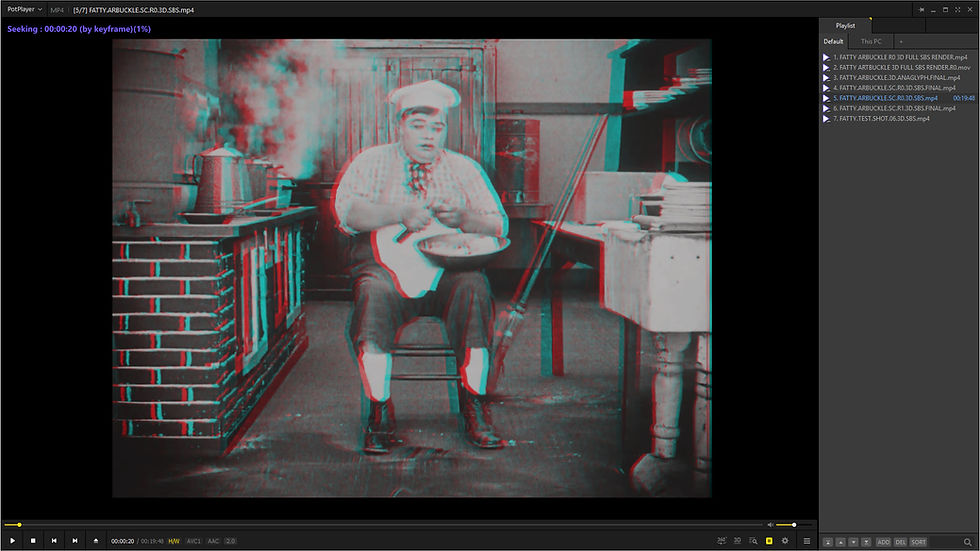
Watch Side-by-Side 3D movies on an ordinary monitor with free PotPlayer and 3D glasses
Have you got a Side-by-Side (SBS) 3D movie but don't have a 3D TV, 3D projector or VR headset?
You may already have everything you need to watch it in stereoscopic 3D.
With the free PotPlayer media player for Windows, a normal PC display and an inexpensive pair of anaglyph 3D glasses, you can convert a Side-by-Side 3D video into anaglyph 3D playback in real time.
It's a surprisingly simple way to experience 3D movies, and it's particularly useful if you've downloaded or purchased an SBS 3D video and want to check out the stereoscopic effect without specialised 3D hardware.
At EYEPOP-3D, we create professional 2D-to-3D conversions for filmmakers, producers and rights holders, delivering stereoscopic formats including Half SBS, Full SBS, anaglyph & 3D Blu-ray.
In this guide, we'll show you how to take a Full SBS file and use PotPlayer to watch it as anaglyph 3D.
MAC USERS NOTE: PotPlayer is for Windows only and currently it appears uncertain if VLC's anaglyph support is functioning on the Apple Macintosh. Bino3D suggests that it offers similar functionality but is aparently quite tricky to get it to work. There is also a long discussion on the topic on this forum link.
What is Side-by-Side 3D?

Before getting into PotPlayer, it's useful to understand what an SBS 3D file actually contains.
A stereoscopic movie needs two slightly different images — one for your left eye and one for your right.
A Side-by-Side file simply places those two images next to each other:
LEFT EYE | RIGHT EYE
A Full SBS 3D movie therefore contains two full-resolution images inside one video frame.
For example:
1920 × 1080 LEFT EYE + 1920 × 1080 RIGHT EYE
creates a combined video frame of:
3840 × 1080
This is known as Full Side-by-Side or Full SBS.
It is different from Half SBS, where each eye is horizontally compressed into half the available width.
Full SBS
3840 × 1080 total
→ 1920 × 1080 per eye
Half SBS
1920 × 1080 total
→ 960 × 1080 per eye
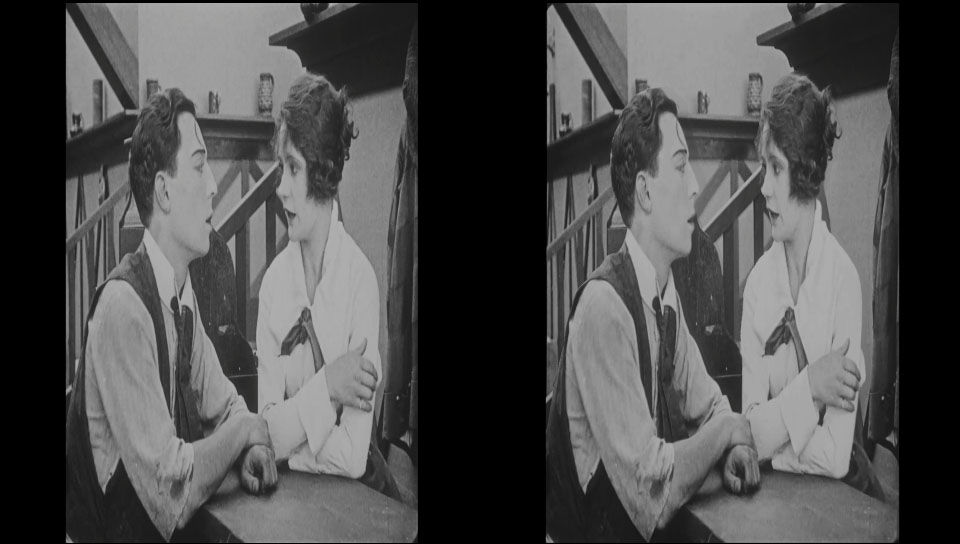
This distinction becomes particularly important when you're using PotPlayer.
Can You Watch SBS 3D on a Normal PC Monitor?
Yes.
A conventional monitor doesn't inherently know what to do with the two images in an SBS movie. Normally, it will simply display them next to each other.
But software can take those two images, separate the left and right eye views and recombine them into another stereoscopic format.
One of the simplest options is anaglyph 3D.
Instead of sending the two eye views to separate displays, anaglyph combines them into a single image using different colour channels.
Your glasses then perform the final separation.
What Is Anaglyph 3D?

Anaglyph is probably the most accessible form of stereoscopic 3D.
You may remember the classic red-and-blue 3D glasses from old comics, magazines and movies.
Modern digital anaglyph commonly uses:
RED + CYAN
The left and right eye images are encoded using different colours. The corresponding filters in the glasses allow each eye to see its intended image.
Your brain then combines the two views to create the perception of depth.
The major advantage is that you don't need a special 3D display.
You can use:
A normal Windows PC or laptop
A conventional monitor
PotPlayer
A pair of compatible 3D glasses
That's enough to watch an SBS movie in 3D.
Which 3D Glasses Do You Need?

This is important.
The glasses must match the anaglyph format selected in PotPlayer.
The most common option is:
Red/Cyan
You need:
Red filter (LEFT EYE) + Cyan filter (RIGHT EYE)
These are widely available and are probably the easiest glasses to find.
However, PotPlayer supports other anaglyph colour combinations too.
Red/Cyan

Glasses: Red + Cyan
This is the most familiar digital anaglyph format and a good starting point for watching SBS movies.
PotPlayer offers several processing variations, including:
Gray
Half Color
Color
Dubois
These different modes make different compromises between colour reproduction, channel separation and crosstalk.
Green/Magenta

Glasses: Green + Magenta
Green/magenta is another established anaglyph system supported by PotPlayer.
If you select a green/magenta output mode, you need glasses with the corresponding green and magenta filters.
Yellow/Blue

Glasses: Yellow/Amber + Blue
You may also encounter yellow/blue anaglyph systems, including ColorCode-style 3D.
Again, the principle is the same:
Match the glasses to the output format.
Red/cyan glasses won't correctly display a green/magenta anaglyph.
How to Watch SBS 3D in Anaglyph Using PotPlayer
Now for the practical part.
Download and install PotPlayer on your Windows PC, then open your SBS 3D movie.
Initially, you will probably see something like:
LEFT IMAGE | RIGHT IMAGE
Don't panic. That's exactly what an SBS movie is supposed to look like before stereoscopic processing. You now need to tell PotPlayer that this is 3D material.
Step 1: Enable 3D Playback
Open PotPlayer's playback options and locate the 3D Video settings & enable the 3D video function.

Enable 3D Video Mode
You then need to tell PotPlayer what type of stereoscopic material you're playing.
For an SBS movie, select:
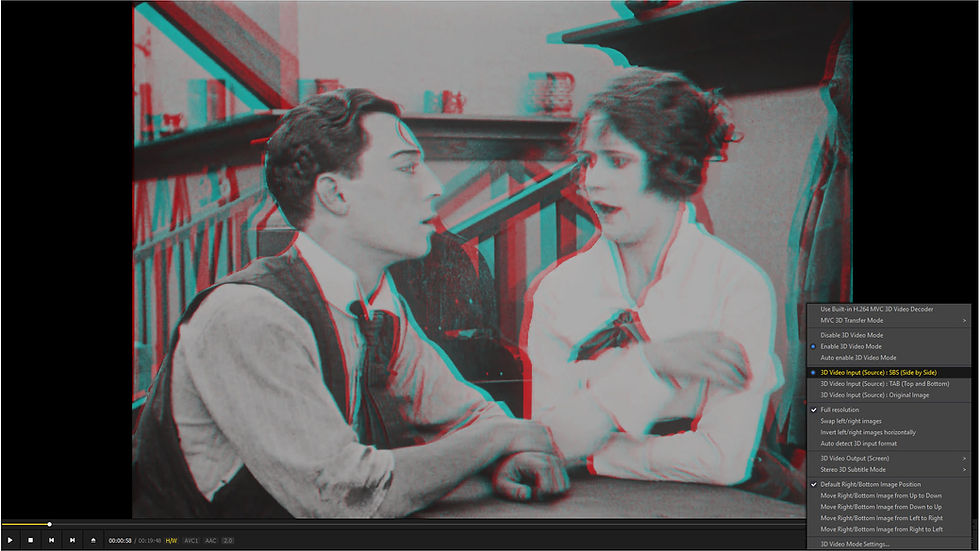
3D Video Input (Source): SBS (Side-by-Side)
PotPlayer will now interpret the two halves of the frame as the left and right eye images.
Step 2: Select the Anaglyph Output
Next, select the appropriate 3D output mode.
For the most common glasses, select a:
Red/Cyan Anaglyph

PotPlayer can produce several different red/cyan variations.
For experimentation, try the different modes and see which produces the best result on your monitor and with your glasses.
Step 3: Turn On "Full Resolution"
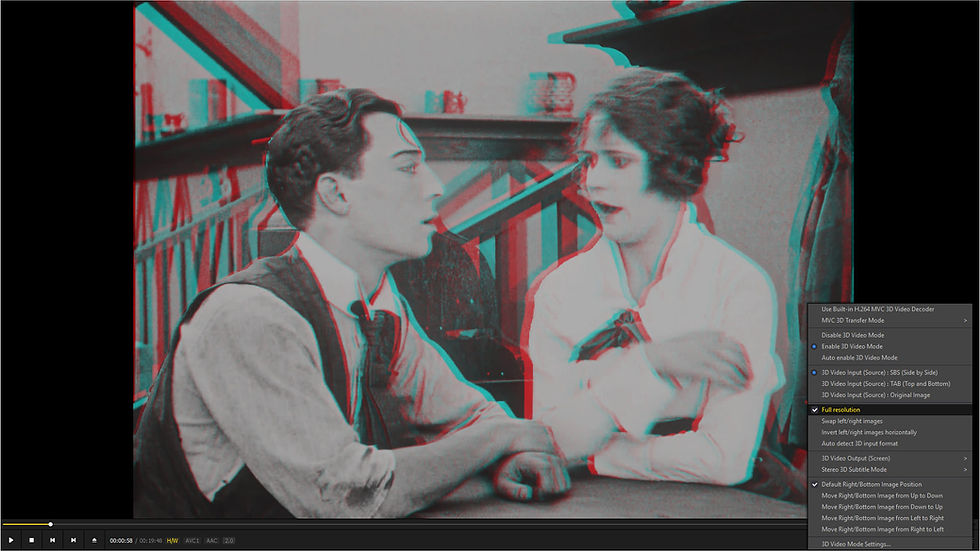
This is the setting that is particularly important when you're working with Full SBS 3D.
If your movie is a Full SBS file, enable:
Full Resolution
Why?
Because a Full SBS file contains a complete-resolution image for each eye.
A 3840 × 1080 file contains:
1920 × 1080 LEFT
and
1920 × 1080 RIGHT
If you are watching a Full SBS EYEPOP conversion, for example, you want PotPlayer to treat those two halves as full-resolution eye views.
Don't confuse Full Resolution with Full SBS
They are related, but they aren't the same thing.
Full SBS describes how the source video is encoded.
Full Resolution is the PotPlayer stereoscopic processing option that tells the player how to handle that source.
If you're using a Full SBS file, make sure this option is enabled.
Full SBS vs Half SBS: Why Does It Matter?
Here's the easiest way to visualise it:
Format | Total Frame | Resolution Per Eye |
Full SBS | 3840 × 1080 | 1920 × 1080 |
Half SBS | 1920 × 1080 | 960 × 1080 |
2D Full HD | 1920 × 1080 | 1920 × 1080 |
A Half SBS file is designed to fit both eye views into a conventional 1920 × 1080 video frame.
That makes the file smaller and more compatible with some playback systems, but each eye receives less horizontal resolution.
With Full SBS, each eye retains the complete 1920 × 1080 image.
For anyone interested in assessing the quality of a professional 2D-to-3D conversion, this distinction matters.
What Is the Best Color Anaglyph Mode in PotPlayer?
There isn't necessarily one perfect setting. Anaglyph is always a compromise. The coloured filters have to separate the two eye images while simultaneously trying to preserve as much of the original colour information as possible. PotPlayer provides several approaches.
The demonstration still used here, is from the forthcoming 3D Blu-ray "Invasion of The Bee Girls".
Gray

The image is essentially monochromatic.
This sacrifices colour but can provide a very obvious stereoscopic separation.
Half Color

A compromise between monochrome and colour.
Some colour information is retained while attempting to maintain reasonable stereo separation.
Color

Attempts to retain more of the original colour information.
This can produce a more visually pleasing result, although the colour filters inevitably affect the image and can create visual discomfort due to lens and image color clashes.
Dubois

Dubois-style processing uses a more sophisticated colour transformation designed to improve colour reproduction and reduce unwanted interference between the two eye images.
It's well worth trying if your version of PotPlayer provides it.
What If the 3D Looks Backwards?

You may occasionally find that your 3D appears inside-out.
Objects that should appear closer suddenly look further away, and vice versa.
This usually means that the left and right eye views are reversed.
Look for PotPlayer's:
Swap Left/Right
or equivalent stereo reversal option.

Try swapping the eye order and check the result again. A correctly converted stereo image should immediately feel much more natural.
Anaglyph Isn't Just a "Cheap" Version of 3D
Anaglyph has an obvious limitation: colour reproduction.
Because each eye is looking through a coloured filter, the complete colour spectrum can't be reproduced in the same way as it can on a modern stereoscopic display.
You may also encounter:
Colour contamination
Crosstalk
Ghosting
Reduced colour saturation
Differences between different types of glasses
For that reason, anaglyph isn't normally the format we'd recommend for professional mastering or final-quality stereoscopic presentation.
But that's not really what makes it useful. Its great strength is accessibility. It allows almost anyone with a Windows PC to experience stereoscopic content without investing in dedicated 3D hardware.
++++++++++++++++++++++++++++++++++++++++++++++++++++++++++++++++++++++
FREE 3D SIDE-BY-SIDE VIDEO DOWNLOAD
The Cook (1918)
Before he became one of the most famous and controversial figures of the silent era, Roscoe “Fatty” Arbuckle was one of Hollywood’s biggest comedy stars. The Cook, released in 1918, is a wonderful example of the anarchic physical comedy that made him so popular.
Arbuckle stars as the cook in a busy restaurant, where his attempts to prepare meals quickly descend into chaos. Working alongside his regular screen partner Buster Keaton, Arbuckle turns the kitchen into a playground of slapstick, elaborate physical gags and wonderfully inventive visual comedy.
The film is particularly notable for giving us an early glimpse of Keaton's extraordinary comic screen presence. The two performers work brilliantly together, with Arbuckle's larger-than-life physicality contrasting with Keaton's famously understated reactions.
Like much silent comedy, The Cook relies almost entirely on visual storytelling. Pots, pans, food and kitchen equipment become props for increasingly ridiculous situations, while the restaurant setting provides an almost limitless supply of opportunities for comic disaster.
For modern audiences, The Cook is also a fascinating piece of film history. It captures Arbuckle and Keaton at an important moment in their careers and demonstrates just how sophisticated silent-film comedy could be more than a century ago.
Today, The Cook remains an entertaining snapshot of early Hollywood — fast-moving, inventive and packed with the kind of visual gags that require no dialogue to get a laugh.
Download the Fatty Arbuckle short film "The Cook" in Full SBS 3D Format. This file is from an archive of abandoned test conversions and is provided free of charge with no guarantee of quality.
Please note it may take up to 24 hours to approve access. Repeatedly requesting will not make it any quicker. When requesting access please request to "VIEW" the directory.
++++++++++++++++++++++++++++++++++++++++++++++++++++++++++++++++++++++
Want to Experience Hand Crafted 2D-to-3D Conversion?

EYEPOP-3D specialises in professional 2D-to-3D conversion for independent filmmakers, producers, studios and rights holders.
Our focus is on creating natural, carefully crafted stereoscopic depth rather than relying on a one-click automated conversion.
We can deliver conversions for:
Theatrical 3D • Full SBS • Half SBS • 3D Blu-ray • Anaglyph • VR/AR
If you have a completed 2D film and are considering giving it a new life in 3D,
EYEPOP-3D can help you explore the possibilities.


So great, finally I can share my 3D-video-experiments with my 3d-less friends. :)